Mastering JavaScript Tree-Shaking

Mastering JavaScript Tree-Shaking

One fantastic feature of JavaScript (compared to say, Python) is that it is possible to bundle your code for packaging; removing everything that is not needed to run your code. We call this “tree-shaking” because the stuff you aren’t using falls out leaving the strongly-attached bits. This reduces the size of your output, whether it’s a NPM module, code to run in a browser, or a NodeJS application.

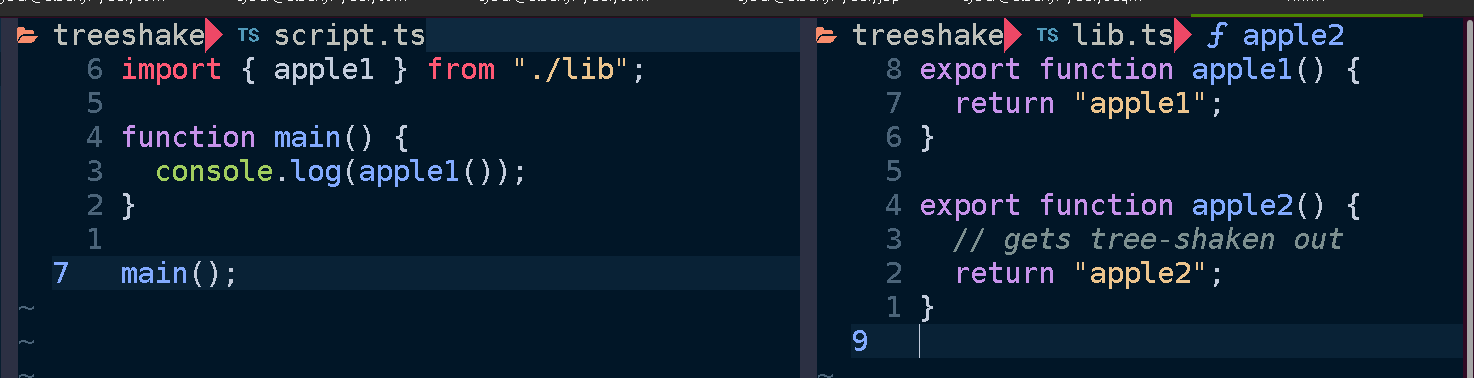
By way of illustration, suppose we have a script that imports a function from a library. Here it calls apple1() from lib.ts:
If we bundle script.ts using esbuild:

esbuild --bundle script.ts > script-bundle.js

Then we get the resulting output:

The main point here being that only apple1 is included in the bundled script. Since we didn’t use apple2 it gets shaken out like an overripe piece of fruit.

Motivation

There are many reasons this is a valuable feature, the main one is performance. Less code means less time spent parsing JavaScript when your code is executed. It means your web app loads faster, your docker image is smaller, your serverless function cold start time is reduced, your NPM module takes up less disk space.

A robust application architecture can be a serverless architecture where your application is composed of discrete functions. These functions can function like an API if you put an API gateway or GraphQL server that invokes the functions for different routes and queries, or can be triggered by messages in queues or files being uploaded to a bucket or as regularly scheduled events. In this setup each function is self-contained, only containing whatever code is needed for its specific functionality and no unrelated code. This is in contrast to a monolith or microservice where the entire application must be loaded up in order to handle a request. No matter how large your project gets, each function remains about the same size.

I build applications using Serverless Stack, which has a terrific developer experience focused on building serverless applications on AWS with TypeScript and CDK in a local development environment. Under the hood it uses esbuild. Let’s peek under the hood.

Mechanics

Conceptually tree-shaking is pretty straightforward; just throw away whatever code our application doesn’t use. However there are a great number of caveats and tricks needed to debug and finesse your bundling.

Tree-shaking is a feature provided by all modern JavaScript bundlers. These include tools like Webpack, Turbopack, esbuild, and rollup. If you ask them to produce a bundle they will do their best to remove unused code. But how do they know what is unused?

The fine details may vary from bundler to bundler and between targets but I’ll give an overview of salient properties and options to be aware of. I’ll use the example of using esbuild to produce node bundles for AWS Lambda but these concepts apply generally to anyone who wants to reduce their bundle size.

Measuring

Before trying to reduce your bundle size you need to look at what’s being bundled, how much space everything takes up, and why. There are a number of tools at our disposal which help visualize and trace the tree-shaking process.

Bundle Buddy

This is one of the best tools for analyzing bundles visually and it has very rich information. You will need to ask your bundler to produce a meta-analysis of the bundling process and run Bundle Buddy on it (it’s all local browser based). It supports webpack, create-react-app, rollup, rome, parcel, and esbuild. For esbuild you specify the --metafile=meta.json option.
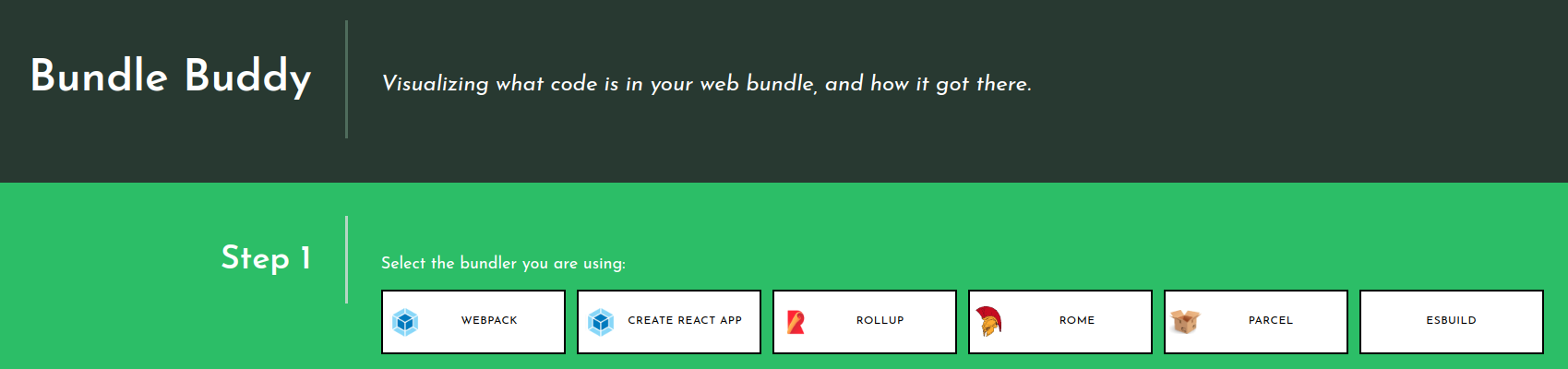
When you upload your metafile to Bundle Buddy you will be presented with a great deal of information. Let’s go through what some of it indicates.
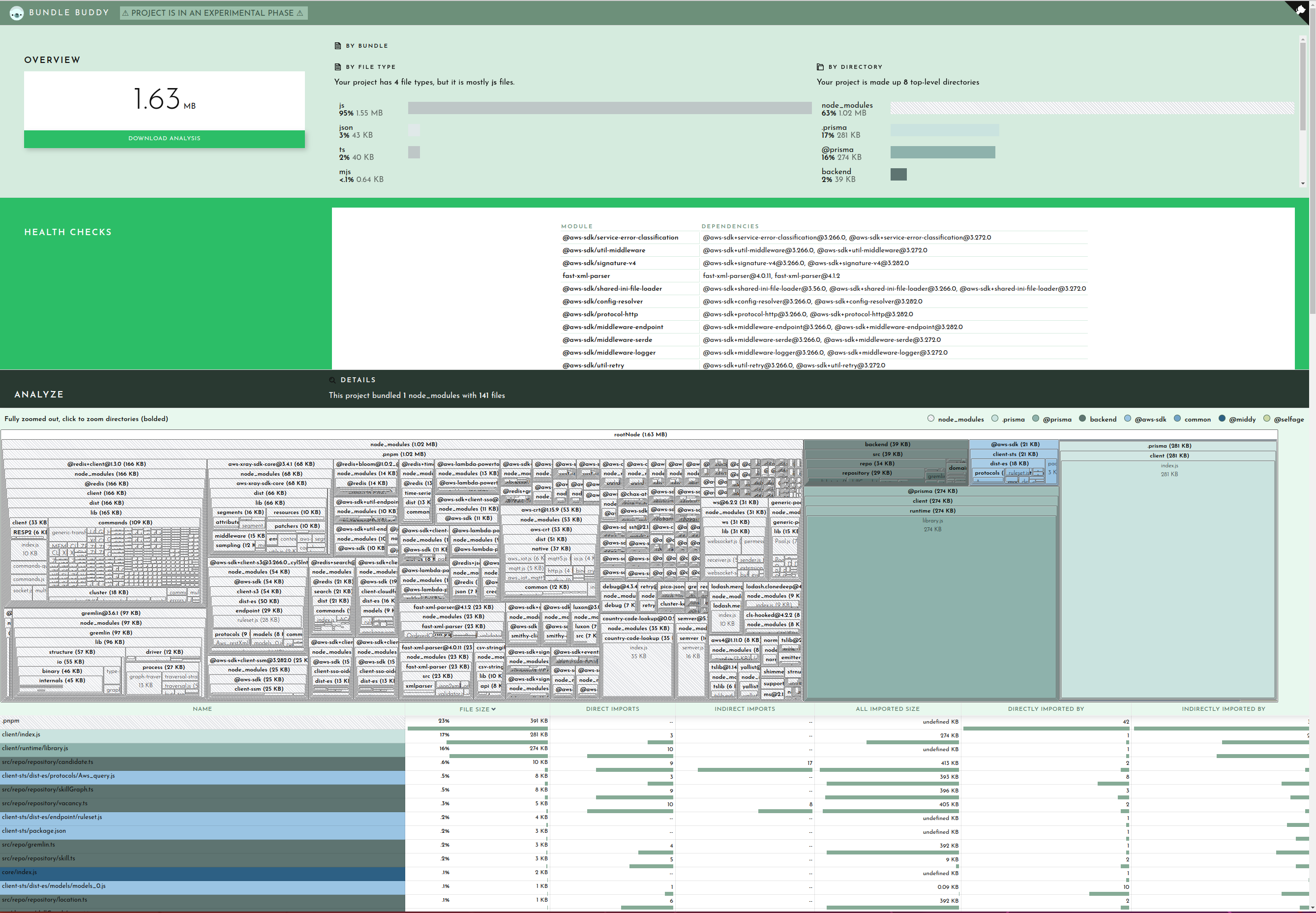
Bundle Buddy in action

Let’s start with the duplicate modules.

This section lets you know that you have multiple versions of the same package in your bundle. This can be due to your dependencies or your project depending on different versions of a package which cannot be resolved to use the same version for some reason.

Here you can see I have versions 3.266.0 and 3.272 of the AWS SDK and two versions of fast-xml-parser. and The best way to hunt down why different versions may be included is to simply ask your package manager. For example you can ask pnpm:

$ pnpm why fast-xml-parser

dependencies:
@aws-sdk/client-cloudformation 3.266.0
├─┬ @aws-sdk/client-sts 3.266.0
│ └── fast-xml-parser 4.0.11
└── fast-xml-parser 4.0.11
@aws-sdk/client-cloudwatch-logs 3.266.0
└─┬ @aws-sdk/client-sts 3.266.0
  └── fast-xml-parser 4.0.11
...
@prisma/migrate 4.12.0
└─┬ mongoose 6.8.1
  └─┬ mongodb 4.12.1
    └─┬ @aws-sdk/credential-providers 3.282.0
      ├─┬ @aws-sdk/client-cognito-identity 3.282.0
      │ └─┬ @aws-sdk/client-sts 3.282.0
      │   └── fast-xml-parser 4.1.2
      ├─┬ @aws-sdk/client-sts 3.282.0
      │ └── fast-xml-parser 4.1.2
      └─┬ @aws-sdk/credential-provider-cognito-identity 3.282.0
        └─┬ @aws-sdk/client-cognito-identity 3.282.0
          └─┬ @aws-sdk/client-sts 3.282.0
            └── fast-xml-parser 4.1.2

So if I want to shrink my bundle I need to figure out how to get it so that both @aws-sdk/client-* and @prisma/migrate can agree on a common version to share so that only one copy of fast-xml-parser needs to end up in my bundle. Since this function shouldn’t even be importing @prisma/migrate (and certainly not mongodb) I can use that as a starting point for tracking down an unneeded import which will discuss shortly. Alternatively you can open a PR for one of the dependencies to use a looser version spec (e.g. ^4.0.0) for fast-xml-parser or @aws-sdk/client-sts.

With duplicate modules out of the way, the main meat of the report is the bundled modules. This will usually be broken up into your code and stuff from node_modules:

When viewing in Bundle Buddy you can click on any box to zoom in for a closer look. We can see that of the 1.63MB that comprises our bundle, 39K is for my actual function code:
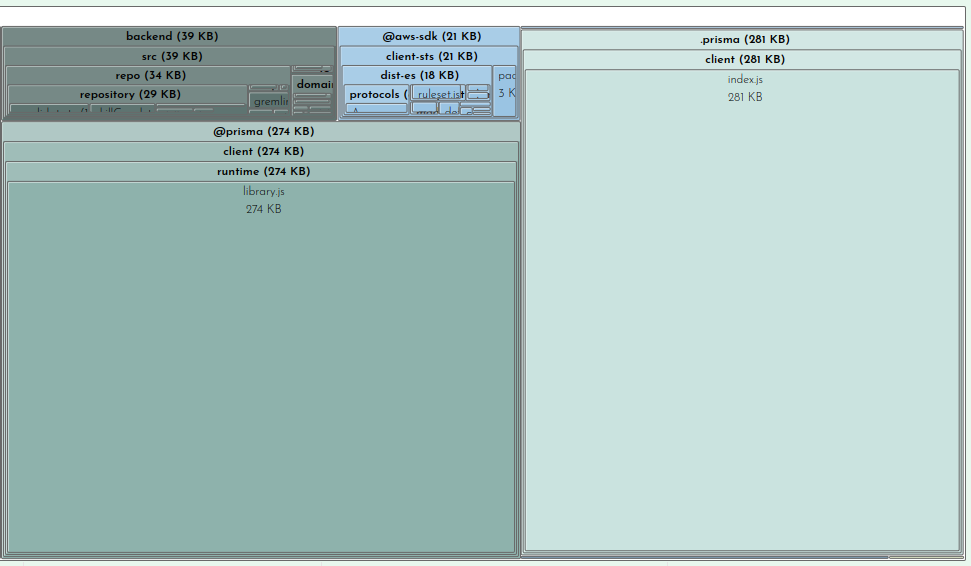
This is interesting but not where we need to focus our efforts.

Clearly the prisma client and runtime are taking up sizable parcels of real-estate. There’s not much you can do about this besides file a ticket on GitHub (as I did here with much of this same information).

But looking at our node_modules we can see at a glance what is taking up the most space:

This is where you can survey what dependencies are not being tree-shaken out. You may have some intuitions about what belongs here, doesn’t belong here, or seems too large. For example in the case of my bundle the two biggest dependencies are on the left there, @redis-client (166KB) and gremlin 97KB). I do use redis as a caching layer for our Neptune graph database, of which gremlin is a client library that one uses to query the database. Because I know my application and this function I know that this function never needs to talk to the graph database so it doesn’t need gremlin. This is another starting point for me to trace why gremlin is being required. We’ll look at that later on when we get into tracing. Also noteworthy is that even though I only use one redis command, the code for handling all redis commands get bundled, adding a cost of 109KB to my bundle.

Finally the last section in the Bundle Buddy readout is a map of what files import other files. You can click in for what looks like a very interesting and useful graph but it seems to be a bit broken. No matter, we can see this same information presented more clearly by esbuild.
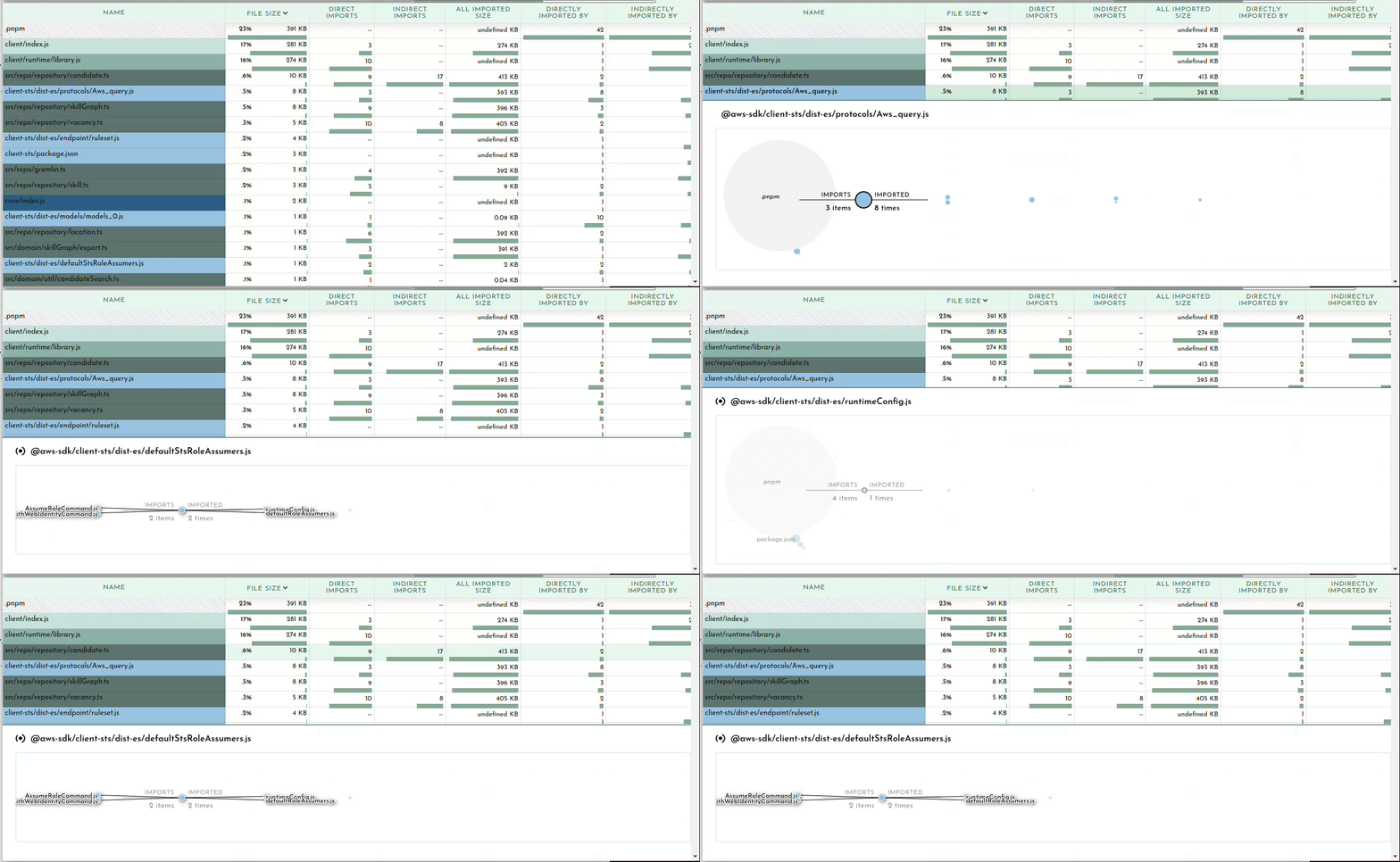
esbuild –analyze

Your bundler can also operate in a verbose mode where it tells you WHY certain modules are being included in your bundle. Once you’ve determined what is taking up the most space in your bundle or identified large modules that don’t belong, it may be obvious to you what the problem is and where and how to fix it. Oftentimes it may not be so clear why something is being included. In my example above of including gremlin, I needed to see what was requiring it.

We can ask our friend esbuild:

esbuild --bundle --analyze --analyze=verbose script.ts --outfile=tmp.js 2>&1 | less

The important bit here being the --analyze=verbose flag. This will print out all traces of all imports so the output gets rather large, hence piping it to less. It’s sorted by size so you can start at the top and see why your biggest imports are being included. A couple down from the top I can see what’s pulling in gremlin:

   ├ node_modules/.pnpm/gremlin@3.6.1/node_modules/gremlin/lib/process/graph-traversal.js ─── 13.1kb ─── 0.7%
   │  └ node_modules/.pnpm/gremlin@3.6.1/node_modules/gremlin/index.js
   │     └ backend/src/repo/gremlin.ts
   │        └ backend/src/repo/repository/skillGraph.ts
   │           └ backend/src/repo/repository/skill.ts
   │              └ backend/src/repo/repository/vacancy.ts
   │                 └ backend/src/repo/repository/candidate.ts
   │                    └ backend/src/api/graphql/candidate/list.ts

This is extremely useful information for tracking down exactly what in your code is telling the bundler to pull in this module. After a quick glance I realized my problem. The file repository/skill.ts contains a SkillRepository class which contains methods for loading a vacancy’s skills which is used by the vacancy repository which is eventually used by my function. Nothing in my function calls the SkillRepository methods which need gremlin, but it does include the SkillRepository class. What I foolishly assumed was that the methods on the class I don’t call will get tree-shaken out. This means that if you import a class, you will be bringing in all possible dependencies any method of that class brings in. Good to know!

@next/bundle-analyzer

This is a colorful but limited tool for showing you what’s being included in your NextJS build. You add it to your next.config.js file and when you do a build it will pop open tabs showing you what’s being bundled in your backend, frontend, and middleware chunks.
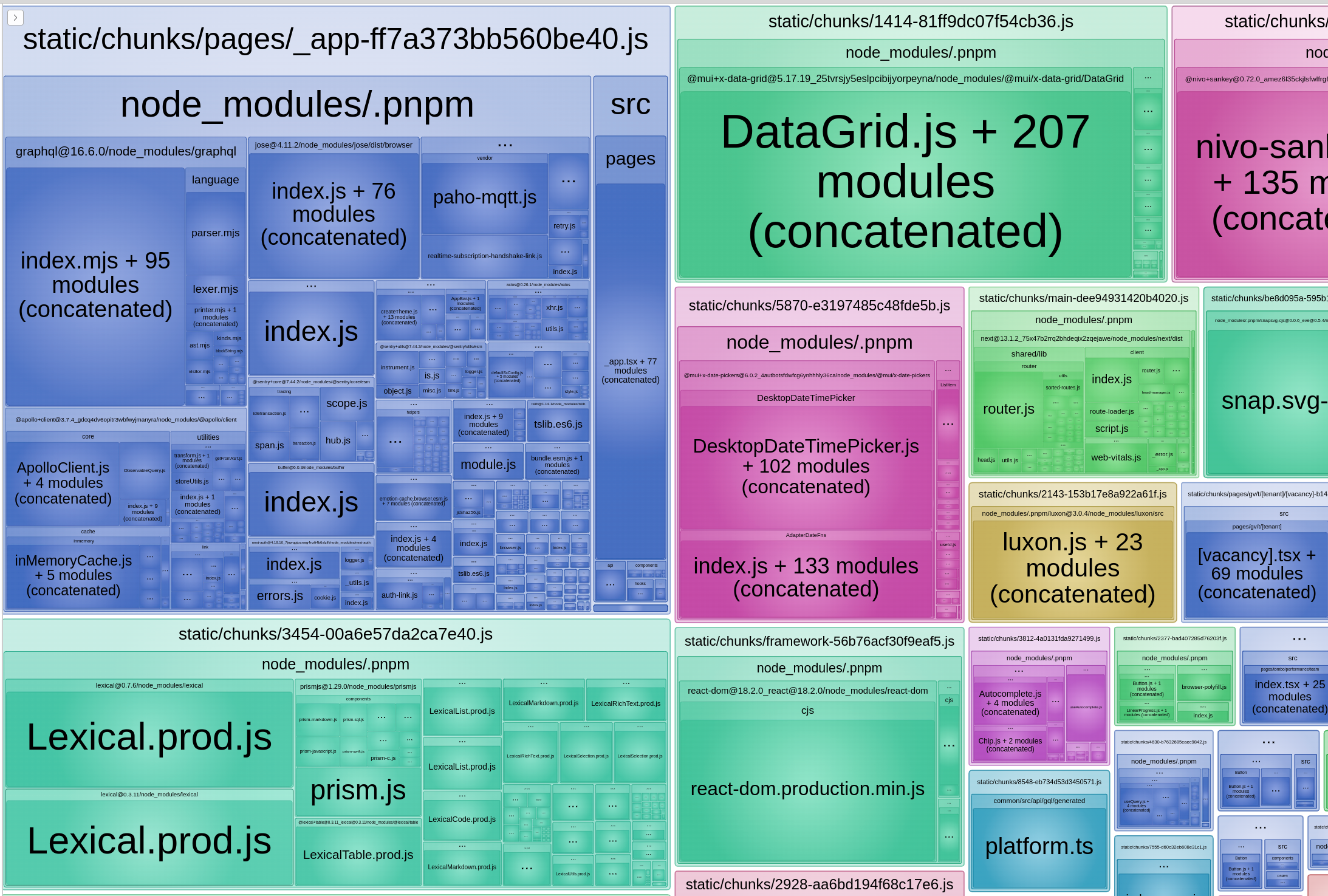
The amount of bullshit @apollo/client pulls in is extremely aggravating to me.

Modularize Imports

It was helpful for learning that using top-level Material-UI imports such as import { Button, Dialog } from "@mui/material" will pull in ALL of @mui/material into your bundle. Perhaps this is because NextJS still is stuck on CommonJS, although that is pure speculation on my part.

While you can fix this by assiduously doing import { Button } from "@mui/material/Button" everywhere this is hard to enforce and tedious. There is a NextJS config option to rewrite such imports:

  modularizeImports: {
    "@mui/material": {
      transform: "@mui/material/{{member}}",
    },
    "@mui/icons-material": {
      transform: "@mui/icons-material/{{member}}",
    },
  },

Webpack Analyzer

Has a spiffy graph of imports and works with Webpack.
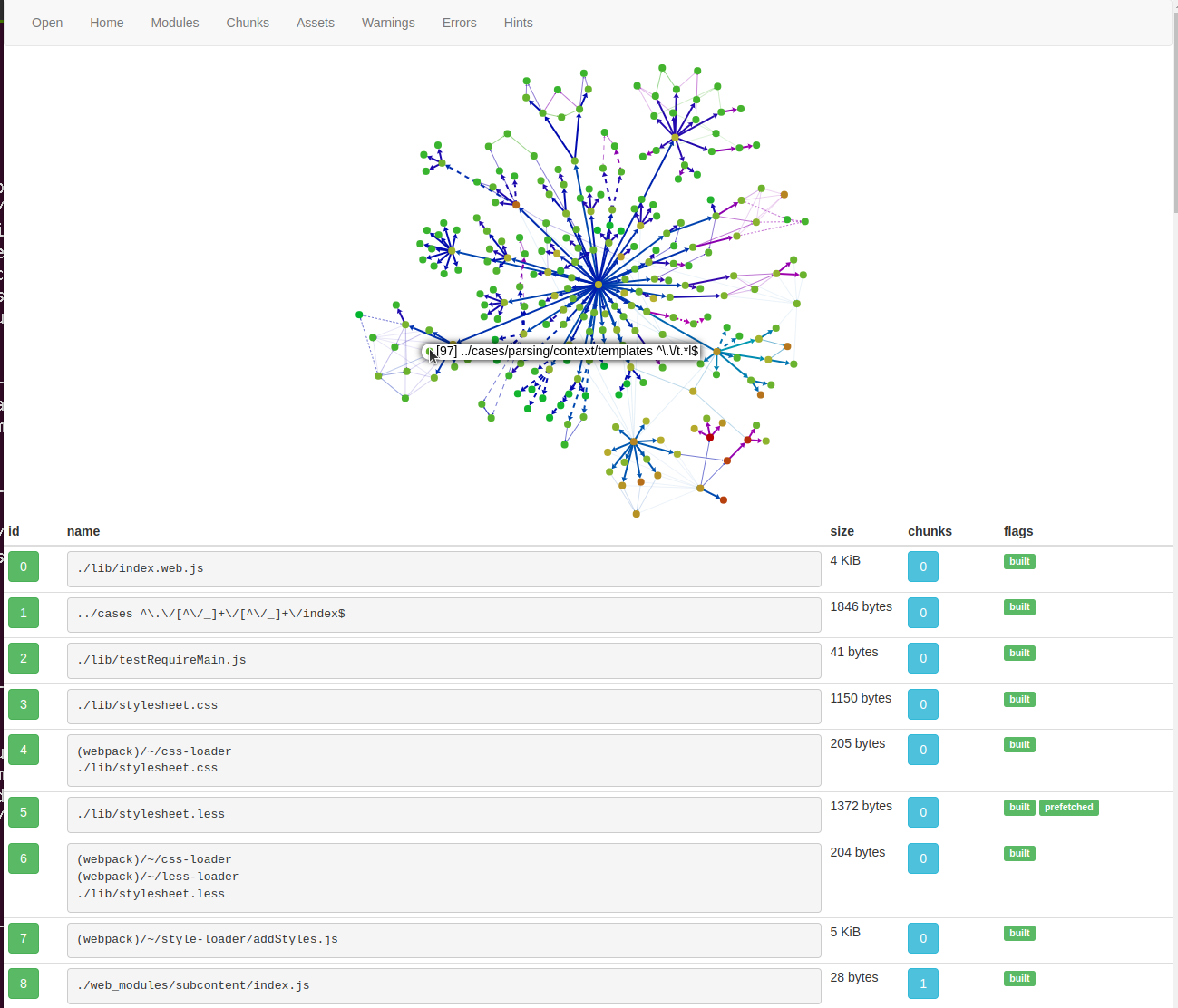
Tips and Tricks

CommonJS vs. ESM

One factor that can affect bundling is using CommonJS vs. EcmaScript Modules (ESM). If you’re not familiar with the difference, the TypeScript documentation has a nice summary and the NodeJS package docs are quite informative and comprehensive. But basically CommonJS is the “old, busted” way of defining modules in JavaScript and makes use of things like require() and module.exports, whereas ESM is the “cool, somewhat less busted” way to define modules and their contents using import and export keywords.

Tree-shaking with CommonJS is possible but it is more wooley due to the more procedural format of defining exports from a module whereas ESM exports are more declarative. The esbuild tool is specifically built around ESM, in the docs it says:

This way esbuild will only bundle the parts of your packages that you actually use, which can sometimes be a substantial size savings. Note that esbuild’s tree shaking implementation relies on the use of ECMAScript module import and export statements. It does not work with CommonJS modules. Many packages on npm include both formats and esbuild tries to pick the format that works with tree shaking by default. You can customize which format esbuild picks using the main fields and/or conditions options depending on the package.

So if you’re using esbuild, it won’t even bother trying unless you’re using ESM-style imports and exports in your code and your dependencies. If you’re still typing require then you are a bad person and this is a fitting punishment for you.

As the documentation highlights, there is a related option called mainFields which affects which version of a package esbuild resolves. There is a complicated system for defining exports in package.json which allows a module to contain multiple versions of itself depending on how it’s being used. It can have one entrypoint if it’s require‘d, a different one if imported, or another if used in a browser.

The upshot is that you may need to tell your bundler explicitly to prefer the ESM (“module“) version of a package instead of the fallback CommonJS version (“main“). With esbuild the option looks something like:

esbuild --main-fields=module,main --bundle script.ts 

Setting this will ensure the ESM version is preferred, which may result in improved tree-shaking.

Minification

Tree-shaking and minification are related but distinct optimizations for reducing the size of your bundle. Tree-shaking eliminates dead code, whereas minification rewrites the result to be smaller, for example replacing a function identifier e.g. “frobnicateMajorBazball” with say “a1“.

Usually enabling minification is a simple option in your bundler. This bundle is 2.1MB minified, but 4.5MB without minification:

❯ pnpm exec esbuild --format=esm --target=es2022 --bundle --platform=node --main-fields=module,main  backend/src/api/graphql/candidate/list.ts --outfile=tmp.js

  tmp.js  4.5mb ⚠️

⚡ Done in 239ms


❯ pnpm exec esbuild --minify --format=esm --target=es2022 --bundle --platform=node --main-fields=module,main  backend/src/api/graphql/candidate/list.ts --outfile=tmp-minified.js

  tmp-minified.js  2.1mb ⚠️

⚡ Done in 235ms

Side effects

Sometimes you may want to import a module not because it has a symbol your code makes use of but because you want some side-effect to happen as a result of importing it. This may be an import that extends jest matchers, or initializes a library like google analytics, or some initialization that is performed when a file is imported.

Your bundler doesn’t always know what’s safe to remove. If you have:

import './lib/initializeMangoids'

In your source, what should your bundler do with it? Should it keep it or remove it in tree-shaking?

If you’re using Webpack (or terser) it will look for a sideEffects property in a module’s package.json to check if it’s safe to assume that simply importing a file does not do anything magical:

{
  "name": "your-project",
  "sideEffects": false
}

Code can also be annotated with /*#__PURE__ */ to inform the minifier that this code has no side effects and can be tree-shaken if not referred to by included code.

var Button$1 = /*#__PURE__*/ withAppProvider()(Button);

Read about it in more detail in the Webpack docs.

Externals

Not every package you depend on needs to necessarily be in your bundle. For example in the case of AWS lambda the AWS SDK is included in the runtime. This is a fairly hefty dependency so it can shave some major slices off your bundle if you leave it out. This is done with the external flag:

❯ pnpm exec esbuild --minify --format=esm --target=es2022 --bundle --platform=node --main-fields=module,main  backend/src/api/graphql/candidate/list.ts --outfile=tmp-minified.js

  tmp-minified.js  2.1mb 


❯ pnpm exec --external:aws-sdk --minify --format=esm --target=es2022 --bundle --platform=node --main-fields=module,main  backend/src/api/graphql/candidate/list.ts --outfile=tmp-minified.js

  tmp-minified.js  1.8mb 

One thing worth noting here is that there are different versions of packages depending on your runtime language and version. Node 18 contains the AWS v3 SDK (--external:@aws-sdk/) whereas previous versions contain the v2 SDK (--external:aws-sdk). Such details may be hidden from you if using the NodejsFunction CDK construct or SST Function construct.

On the CDK slack it was recommended to me to always bundle the AWS SDK in your function because you may be developing against a different version than what is available in the runtime. Or you can pin your package.json to use the exact version in the runtime.

Another reason to use externals is if you are using a layer. You can tell your bundler that the dependency is already available in the layer so it’s not needed to bundle it. I use this for prisma and puppeteer.

Performance Impacts

For web pages the performance impacts are instantly noticeable with a smaller bundle size. Your page will load faster both over the network and in terms of script parsing and execution time.

Another way to get an idea of what your node bundle is actually doing at startup is to profile it. I really like the 0x tool which can run a node script and give you a flame graph of where CPU time is spent. This can be an informative visualization and let you dig into what is being called when your script runs:

For serverless applications you can inspect the cold start (“initialization”) time for your function on your cloud platform. I use the AWS X-Ray tracing tool. Compare before and after some aggressive bundle size optimizations:

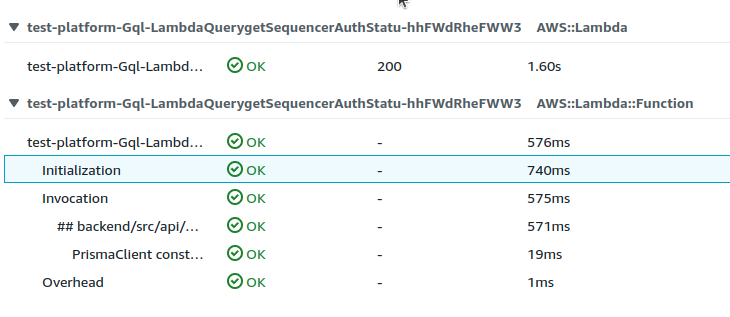
The cold-start time went from 2.74s to 1.60s. Not too bad.

Frameworkless Web Applications

Since we have (mostly) advanced beyond CGI scripts and PHP the default tool many people reach for when building a web application is a framework. Like drafting a standard legal contract or making a successful Hollywood film, it’s good to have a template to work off of. A framework lends structure to your application and saves you from having to reinvent a bunch of wheels. It’s a solid foundation to build on which can be a substantial “batteries included” model (Rails, Django, Spring Boot, Nest) or a lightweight “slap together whatever shit you need outta this” sort of deal (Flask, Express).

Foundations can be handy.

The idea of a web framework is that there are certain basic features that most web apps need and that these services should be provided as part of the library. Nearly all web frameworks will give you some custom implementation of some or all of:

  • Configuration
  • Logging
  • Exception trapping
  • Parsing HTTP requests
  • Routing requests to functions
  • Serialization
  • Gateway adaptor (WSGI, Rack, WAR)
  • Middleware architecture
  • Plugin architecture
  • Development server

There are many other possible features but these are extremely common. Just about every framework has its own custom code to route a parsed HTTP request to a handler function, as in “call hello() when a GET request comes in for /hello.”

There are many great things to say about this approach. The ability to run your application on any sort of host from DigitalOcean to Heroku to EC2 is something we take for granted, as well as being able to easily run a web server on your local environment for testing. There is always some learning curve as you learn the ins and outs of how you register a URL route in this framework or log a debug message in that framework or add a custom serializer field.

But maybe we shouldn’t assume that our web apps always need to be built with a framework. Instead of being the default tool we grab without a moment’s reflection, now is a good time to reevaluate our assumptions.

Serverless

What struck me is that a number of the functions that frameworks provide are not needed if I go all-in on AWS. Long ago I decided I’m fine with Bezos owning my soul and acceded to writing software for this particular vendor, much as many engineers have built successful applications locked in to various layers of software abstraction. Early programmers had to decide which ISA or OS they wanted to couple their application to, later we’re still forced to make non-portable decisions but at a higher layer of abstraction. My python or JavaScript code will run on any CPU architecture or UNIX OS, but features from my cloud provider may restrict me to that cloud. Which I am totally fine with.

I’ve long been a fan of and written about serverless applications on this blog because I enjoy abstracting out as much of my infrastructure as possible so as to focus on the logic of my application that I’m interested in. My time is best spent concerning myself with business logic and not wrangling containers or deployments or load balancer configurations or gunicorn.

I’ve had a bit of a journey over the years adopting the serverless mindset, but one thing has been holding me back and it’s my attachment to web frameworks. While it’s quite common and appropriate to write serverless functions as small self-contained scripts in AWS Lambda, building a larger application in this fashion feels like trying to build a house without a foundation. I’ve done considerable experimentation mostly with trying to cram Flask into Lambda, where you still have all the comforts of your familiar framework and it handles all the routing inside a single function. You also have the flexibility to easily take your application out of AWS and run it elsewhere.

There are a number of issues with the approach of putting a web framework into a Lambda function. For one, it’s cheating. For another, when your application grows large enough the cold start time becomes a real problem. Web frameworks have the side-effect of loading your entire application code on startup, so any time a request comes in and there isn’t a warm handler to process it, the client must wait for your entire app to be imported before handling the request. This means users occasionally experience an extra few seconds of delay on a request, not good from a performance standpoint. There are simple workarounds like provisioned concurrency but it is a clear sign there is a flaw in the architecture.

Classic web frameworks are not appropriate for building a truly serverless application. It’s the wrong tool for the architecture.

The Anti-Framework

Assuming you are fully bought in to AWS and have embraced the lock-in lifestyle, life is great. AWS acts like a framework of its own providing all of the facilities one needs for a web application but in the form of web services of the Amazonian variety. If we’re talking about RESTful web services, it’s possible to put together an extremely scalable, maintainable, and highly available application.

No docker, kubernetes, or load balancers to worry about. You can even skip the VPC if you use the Aurora Data API to run SQL queries.

The above list could go on for a very long time but you get the point. If we want to be as lazy as possible and leverage cloud services as much as possible then what we really want is a tool for composing these services in an expressive and familiar fashion. Amazon’s new Cloud Development Kit (CDK) is just the tool for that. If you’ve never heard of CDK you can read a friendly introduction here or check out the official docs.

In short CDK lets you write high-level code in Python, TypeScript, Java or .NET, and compile it to a CloudFormation template that describes your infrastructure. A brief TypeScript example from cursed-webring:

// API Gateway with CORS enabled
const api = new RestApi(this, "cursed-api", {
  restApiName: "Cursed Service",
  defaultCorsPreflightOptions: {
    allowOrigins: apigateway.Cors.ALL_ORIGINS,
  },
  deployOptions: { tracingEnabled: true },
});
// defines the /sites/ resource in our API
const sitesResource = api.root.addResource("sites");
// get all sites handler, GET /sites/
const getAllSitesHandler = new NodejsFunction(
  this,
  "GetCursedSitesHandler",
  {
    entry: "resources/cursedSites.ts",
    handler: "getAllHandler",
    tracing: Tracing.ACTIVE,
  }
);
sitesResource.addMethod("GET", new LambdaIntegration(getAllSitesHandler));

Is CDK a framework? It depends how you define “framework” but I consider more to be infrastructure as code. By allowing you to effortlessly wire up the services you want in your application, CDK more accurately removes the need for any sort of traditional web framework when it comes to features like routing or responding to HTTP requests.

While CDK provides a great way to glue AWS services together it has little to say when it comes to your application code itself. I believe we can sink even lower into the proverbial couch by decorating our application code with metadata that generates the CDK resources our application declares, specifically Lambda functions and API Gateway routes. I call it an anti-framework.

@JetKit/CDK

Why TypeScript?

As an aside, TypeScript is now my preferred choice for backend development. JavaScript no, but TypeScript yes. The rapid evolution and improvements in the language with Microsoft behind it have been impressive. The language is as strict as you want it to be. Having one set of tooling, CI/CD pipelines, docs, libraries and language experience in your team is much easier than supporting two. All the frontends we work with are React and TypeScript, why not use the same linters, type checking, commit hooks, package repository, formatting configuration, and build tools instead of maintaining say, one set for a Python backend and another for a TypeScript frontend?

Python is totally fine except for its lack of type safety. Do not even attempt to blog at me ✋🏻 about mypy or pylance. It is like saying a Taco Bell is basically a real taqueria. Might get you through the day but it’s not really the same thing 🌮

Construct Generation

So we’ve seen the decorated application code, how does it get turned into cloud resources? With the ResourceGeneratorConstruct, a CDK construct that takes your functions and classes as input and generates AWS resources as output.

import { CorsHttpMethod, HttpApi } from "@aws-cdk/aws-apigatewayv2"
import { Construct, Duration, Stack, StackProps, App } from "@aws-cdk/core"
import { ResourceGeneratorConstruct } from "@jetkit/cdk"
import { aliveHandler, AlbumApi } from "../backend/src"  // your app code
export class InfraStack extends Stack {
  constructor(scope: App, id: string, props?: StackProps) {
    super(scope, id, props)
    // create API Gateway
    const httpApi = new HttpApi(this, "Api", {
      corsPreflight: {
        allowHeaders: ["Authorization"],
        allowMethods: [CorsHttpMethod.ANY],
        allowOrigins: ["*"],
        maxAge: Duration.days(10),
      },
    })
    // transmute your app code into infrastructure
    new ResourceGeneratorConstruct(this, "Generator", {
      resources: [AlbumApi, aliveHandler], // supply your API views and functions here
      httpApi,
    })
  }
}

It is necessary to explicitly pass the functions and classes you want resources for to the generator because otherwise esbuild will optimize them out of existence.

Try It Out

I’m a big fan of Serverless Stack, a lightweight toolkit for doing CDK-driven development with a few very useful features like the most advanced local development environment for AWS serverless applications.

Also please take a look at my starter kit for new serverless TypeScript applications.

Woodworker Designs and Builds the Perfect Tiny House Boat called the Le Koroc
Maybe a foundation isn’t needed after all

Web Services with AWS CDK

If you want to build a cloud-native web service, consider reaching for the AWS Cloud Development Kit. CDK is a new generation of infrastructure-as-code (IaC) tools designed to make packaging your code and infrastructure together as seamless and powerful as possible. It’s great for any application running on AWS, and it’s especially well-suited to serverless applications.

The CDK consists of a set of libraries containing resource definitions and higher-level constructs, and a command line interface (CLI) that synthesizes CloudFormation from your resource definitions and manages deployments. You can imperatively define your cloud resources like Lambda functions, S3 buckets, APIs, DNS records, alerts, DynamoDB tables, and everything else in AWS using TypeScript, Python, .NET, or Java. You can then connect these resources together and into more abstract groupings of resources and finally into stacks. Typically one entire service would be one stack.

class HelloCdkStack extends Stack {
  constructor(scope: App, id: string, props?: StackProps) {
    super(scope, id, props);

    new s3.Bucket(this, 'MyFirstBucket', {
      versioned: true
    });
  }
}

CDK doesn’t exactly replace CloudFormation because it generates CloudFormation markup from your resource and stack definitions. But it does mean that if you use CDK you don’t really ever have to manually write CloudFormation ever again. CloudFormation is a declarative language, which makes it challenging and cumbersome to do simple things like conditionals, for example changing a parameter value or not including a resource when your app is being deployed to production. When using a typed language you get the benefit of writing IaC with type checking and code completion, and the ability to connect resources together with a very natural syntax. One of the real time-saving benefits of CDK is that you can group logical collections of resources into reusable classes, defining higher level constructs like CloudWatch canary scripts, NodeJS functions, S3-based websites with CloudFront, and your own custom constructs of whatever you find yourself using repeatedly.

The CLI for CDK gives you a set of tools mostly useful for deploying your application. A simple cdk deploy parses your stacks and resources, synthesizes CloudFormation, and deploys it to AWS. The CLI is basic and relatively new, so don’t expect a ton of mature features just yet. I am still using the Serverless framework for serious applications because it has a wealth of built-in functionality and useful plugins for things like testing applications locally and tailing CloudWatch logs. AWS’s Serverless Application Model (SAM) is sort of equivalent to Serverless, but feels very Amazon-y and more like a proof-of-concept than a tool with any user empathy. The names of all of these tools are somewhat uninspired and can understandably cause confusion, so don’t feel bad if you feel a little lost.

Sample CDK Application

I built a small web service to put the CDK through its paces. My application has a React frontend that fetches a list of really shitty websites from a Lambda function and saves them in the browser’s IndexedDB, a sort of browser SQL database. The user can view the different shitty websites with previous and next buttons and submit a suggestion of a terrible site to add to the webring. You can view the entire source here and the finished product at cursed.lol.

The Cursed Webring

To kick off a CDK project, run the init command: cdk init app --language typescript.

This generates an application scaffold we can fill in, beginning with the bin/cdk.ts script if using TypeScript. Here you can optionally configure environments and import your stacks.

#!/usr/bin/env node
import "source-map-support/register";
import * as cdk from "@aws-cdk/core";
import { CursedStack } from "../lib/stack";

const envProd: cdk.Environment = {
  account: "1234567890",
  region: "eu-west-1",
};

const app = new cdk.App();
new CursedStack(app, "CursedStack", { env: envProd });

The environment config isn’t required; by default your application can be deployed into any region and AWS account, making it easy to share and create development environments. However if you want to pre-define some environments for dev/staging/prod you can do that explicitly here. The documentation suggests using environment variables to select the desired AWS account and region at deploy-time and then writing a small shell script to set those variables when deploying. This is a very flexible and customizable way to manage your deployments, but it lacks the simplicity of Serverless which has a simple command-line option to select which stage you want. CDK is great for customizing to your specific needs, but doesn’t quite have that out-of-the-box user friendliness.

DynamoDB

Let’s take a look at a construct that defines a DynamoDB table for storing user submissions:

import * as core from "@aws-cdk/core";
import * as dynamodb from "@aws-cdk/aws-dynamodb";

export class CursedDB extends core.Construct {
  submissionsTable: dynamodb.Table;

  constructor(scope: core.Construct, id: string) {
    super(scope, id);

    this.submissionsTable = new dynamodb.Table(this, "SubmissionsTable", {
      partitionKey: {
        name: "id",
        type: dynamodb.AttributeType.STRING,
      },
      billingMode: dynamodb.BillingMode.PAY_PER_REQUEST,
    });
  }
}

Here we create a table that has a string id primary key. In this example we save the table as a public property (this.submissionsTable) on the instance of our Construct because we will want to reference the table in our Lambda function in order to grant write access and provide the name of the table to the function so that it can write to the table. This concept of using a class property to keep track of resources you want to pass to other constructs isn’t anything particular to CDK – it’s just something I decided to do on my own to make it easy to connect different pieces of my service together.

Lambda Functions

Here I declare a construct which defines two Lambda functions. One function fetches a list of websites for the user to browse, and the other handles posting submissions which saved into our DynamoDB submissionsTable as well as Slacked to me. I am extremely lazy and manage most of my applications this way. We use the convenient NodejsFunction high-level construct to make our lives easier. This is the most complex construct of our stack. It:

  • Loads a secret containing our Slack webhook URL
  • Defines a custom property submissionsTable that it expects to receive
  • Defines an API Gateway with CORS enabled
  • Creates an API resource (/sites/) to hold our function endpoints
  • Defines two Lambda NodeJS functions (note that our source files are TypeScript – compilation happens automatically)
  • Connects the Lambda functions to the API resource as GET and POST endpoints
  • Grants write access to the submissionsTable to the submitSiteHandler function
import * as core from "@aws-cdk/core";
import * as apigateway from "@aws-cdk/aws-apigateway";
import * as sm from "@aws-cdk/aws-secretsmanager";
import { NodejsFunction } from "@aws-cdk/aws-lambda-nodejs";
import { LambdaIntegration, RestApi } from "@aws-cdk/aws-apigateway";
import { Table } from "@aws-cdk/aws-dynamodb";

// ARN of a secret containing the slack webhook URL
const slackWebhookSecret =
  "arn:aws:secretsmanager:eu-west-1:178183757879:secret:cursed/slack_webhook_url-MwQ0dY";

// required properties to instantiate our construct
// here we pass in a reference to our DynamoDB table
interface CursedSitesServiceProps {
  submissionsTable: Table;
}

export class CursedSitesService extends core.Construct {
  constructor(
    scope: core.Construct,
    id: string,
    props: CursedSitesServiceProps
  ) {
    super(scope, id);

    // load our webhook secret at deploy-time
    const secret = sm.Secret.fromSecretCompleteArn(
      this,
      "SlackWebhookSecret",
      slackWebhookSecret
    );

    // our API Gateway with CORS enabled
    const api = new RestApi(this, "cursed-api", {
      restApiName: "Cursed Service",
      defaultCorsPreflightOptions: {
        allowOrigins: apigateway.Cors.ALL_ORIGINS,
      },
    });

    // defines the /sites/ resource in our API
    const sitesResource = api.root.addResource("sites");

    // get all sites handler, GET /sites/
    const getAllSitesHandler = new NodejsFunction(
      this,
      "GetCursedSitesHandler",
      {
        entry: "resources/cursedSites.ts",
        handler: "getAllHandler",
      }
    );
    sitesResource.addMethod("GET", new LambdaIntegration(getAllSitesHandler));

    // submit, POST /sites/
    const submitSiteHandler = new NodejsFunction(
      this,
      "SubmitCursedSiteHandler",
      {
        entry: "resources/cursedSites.ts",
        handler: "submitHandler",
        environment: {
          // let our function access the webhook and dynamoDB table
          SLACK_WEBHOOK_URL: secret.secretValue.toString(),
          CURSED_SITE_SUBMISSIONS_TABLE_NAME: props.submissionsTable.tableName,
        },
      }
    );
    // allow submit function to write to our dynamoDB table
    props.submissionsTable.grantWriteData(submitSiteHandler);
    sitesResource.addMethod("POST", new LambdaIntegration(submitSiteHandler));
  }
}

While there’s a lot going on here it is very readable if taken line-by-line. I think this showcases some of the real expressibility of CDK. That props.submissionsTable.grantWriteData(submitSiteHandler) stanza is really 👨🏻‍🍳👌🏻. It grants that one function permission to write to the DynamoDB table that we defined in our first construct. We didn’t have to write any IAM policy statements, reference CloudFormation resources, or even look up exactly which actions this statement needs to consists of. This gives you a bit of the flavor of CDK’s simplicity compared to writing CloudFormation by hand.

If you’d like to look at the source code of these Lambdas you can find it here. Fetching the list of sites is accomplished by loading a Google Sheet as a CSV (did I mention I’m really lazy?) and the submission handler does a simple DynamoDB Put call and hits the Slack webhook with the submission. I love this kind of web service setup because once it’s deployed it runs forever and I never have to worry about managing it again, and it costs roughly $0 per month. If a website is submitted I can evaluate it and decide if it’s shitty enough to be included, and if so I can just add it to the Google Sheet. And I have a record of all submissions in case I forget or one gets lost in Slack or something.

CloudFront CDN

Let’s take a look at one last construct I put together for this application, a CloudFront CDN distribution in front of a S3 static website bucket. I realized the need to mirror many of these lame websites because due to their inherent crappiness they were slow, didn’t support HTTPS (needed when iFraming), and might not stay up forever. A little curl --mirror magic fixed that right up.

It’s important to preserve these treasures

Typically defining a CloudFront distribution with HTTPS support is a bit of a headache. Again the high-level constructs you get included with CDK really shine here and I made use of the CloudFrontWebDistribution construct to define just what I needed:

import {
  CloudFrontWebDistribution,
  OriginProtocolPolicy,
} from "@aws-cdk/aws-cloudfront";
import * as core from "@aws-cdk/core";

// cursed.llolo.lol ACM cert
const certificateArn =
  "arn:aws:acm:us-east-1:1234567890:certificate/79e60ba9-5517-4ce3-8ced-2d9d1ddb1d5c";

export class CursedMirror extends core.Construct {
  constructor(scope: core.Construct, id: string) {
    super(scope, id);

    new CloudFrontWebDistribution(this, "cursed-mirrors", {
      originConfigs: [
        {
          customOriginSource: {
            domainName: "cursed.llolo.lol.s3-website-eu-west-1.amazonaws.com",
            httpPort: 80,
            originProtocolPolicy: OriginProtocolPolicy.HTTP_ONLY,
          },
          behaviors: [{ isDefaultBehavior: true }],
        },
      ],
      aliasConfiguration: {
        acmCertRef: certificateArn,
        names: ["cursed.llolo.lol"],
      },
    });
  }
}

This creates a HTTPS-enabled CDN in front of my existing S3 bucket with static website hosting. I could have created the bucket with CDK as well but, since there can only be one bucket with this particular domain that seemed a bit overkill. If I wanted to make this more reusable these values could be stack parameters.

The Stack

Finally the top-level Stack contains all of our constructs. Here you can see how we pass the DynamoDB table provided by the CursedDB construct to the CursedSitesService containing our Lambdas.

import * as cdk from "@aws-cdk/core";
import { CursedMirror } from "./cursedMirror";
import { CursedSitesService } from "./cursedSitesService";
import { CursedDB } from "./db";

export class CursedStack extends cdk.Stack {
  constructor(scope: cdk.Construct, id: string, props?: cdk.StackProps) {
    super(scope, id, props);

    const db = new CursedDB(this, "CursedDB");
    new CursedSitesService(this, "CursedSiteServices", {
      submissionsTable: db.submissionsTable,
    });
    new CursedMirror(this, "CursedSiteMirrorCDN");
  }
}

Putting it all together, all that’s left to do is run cdk deploy to summon our cloud resources into existence and write our frontend.

Security Warnings

It’s great that CDK asks for confirmation before opening up ports:

Is This Better?

Going through this exercize of creating a real service using nothing but CDK was a great way for me to get more comfortable with the tools and concepts behind it. Once I wrapped my head around the way the constructs fit together and started discovering all of the high-level constructs already provided by the libraries I really started to dig it. Need to load some secrets? Need to define Lambda functions integrated to API Gateway? Need a CloudFront S3 bucket website distribution? Need CloudWatch canaries? It’s already there and ready to go along with strict compile-time checking of your syntax and properties. I pretty much never encountered a situation where my code compiled but the deployment was invalid, a vastly improved state of affairs from trying to write CloudFormation manually.

And what about Terraform? In my humble opinion if you’re going to build cloud-native software it’s a waste of effort to abstract out your cloud provider and their resources. Better to embrace the tooling and particulars of one provider and specialize instead of pursuing some idealistic cloud-agnostic setup at a great price of efficiency. Multi-cloud is the worst practice.

The one thing that I missed most from the Serverless framework was tailing my CloudWatch logs. When I had issues in my Lambda logic (not something the CDK can fix for you) I had to go into the CloudWatch console to look at the logs instead of simply being able to tail them from the command line. The upshot though is that CDK is simply code, and writing your own tooling around it using the AWS API should be straightforward enough. I expect SAM and the CDK CLI to only get more mature and user-friendly over time, so I imagine I’ll be building projects of increasing seriousness with them as time progresses.

If you want to learn more, start with the CDK docs. And if you know of any cursed websites please feel free to mash that submit button.